
The NF8108 cable tester is a great tool, but it has an unpleasant catch.
Big ones, small ones, embedded ones—and IP cameras are becoming increasingly common these days, not to mention access control systems and the like.
Often, all this equipment is connected over twisted-pair cable. Wireless systems are far from convenient in every situation, especially at industrial sites.
And naturally, all this equipment needs to be monitored.
Read on for a description of the device that helps me do that.
Some of my readers found out I had this device and asked me to write a review. Although I've had it for quite a while, I'm still going to grant their request.
This whole story began a long time ago, back at the beginning of the year.
A technician and I were installing several IP cameras. It was just before New Year's, and, as always, everything had to be done yesterday. Anyway, we laid almost 400 meters of cable and installed four cameras (which isn't as easy as it sounds at an industrial site).
So there we were, installing a digital video surveillance system with PoE and a Cisco switch. The technician installed the cameras, crimped the cable ends, and connected everything.
I was crimping the cable ends in the server room while he stood nearby and watched. I explained why the blue pair goes in the middle. Then he told me he'd simply crimped the pairs in sequence. Off he went to redo them. He came back, we started everything up, and only one of the four cameras came online.
I was stunned. I ran around trying to ping the cameras. PoE was lit, the link was up, but nothing worked.
I sent him back to redo the crimps. When he got to one of the cameras, I told him I'd redo it myself. I looked and saw he'd swapped two other wires. I recrimped it, showed him, and sent him off to keep checking the rest.
Anyway, we got it working. It was two in the morning.
The funny thing is, shortly before that we'd installed several cameras in the same place. He'd crimped the cables, and everything worked right away.
After that, I realized that “something had to change” and started looking for some kind of cable tester.
First I came across a basic continuity tester for a few bucks.
I thought that wouldn't be enough. I kept looking and found a project for a DIY device that could also measure the cable length up to a break.
I even considered building one, but then someone recommended this tester.
I ordered and paid for it, and 18 days later (the fast delivery surprised me) I picked up a large yellow package at the post office.

Inside, without any box, was the tester itself, packed in a small case.
I won't review the case itself—there isn't much to say about it anyway. I'll just say it's quite handy.

I was surprised as soon as I got to the battery compartment (batteries aren't included).
I knew there were two versions of the device: one takes two AA batteries, the other four AAA batteries.
The first version is the newer one; the second is obsolete.
Mine was neither one nor the other. Both versions are covered in my colleague former's review. He did an excellent job, and I doubt I can do better. Besides, there's little point in repeating the same things, so I'll focus on the differences and shortcomings I found.

After installing the batteries and turning the device on, I opened the menu to check the firmware version.
It was the old version 5.1. Not good.
The device also has no screen backlight, unlike the newer version.

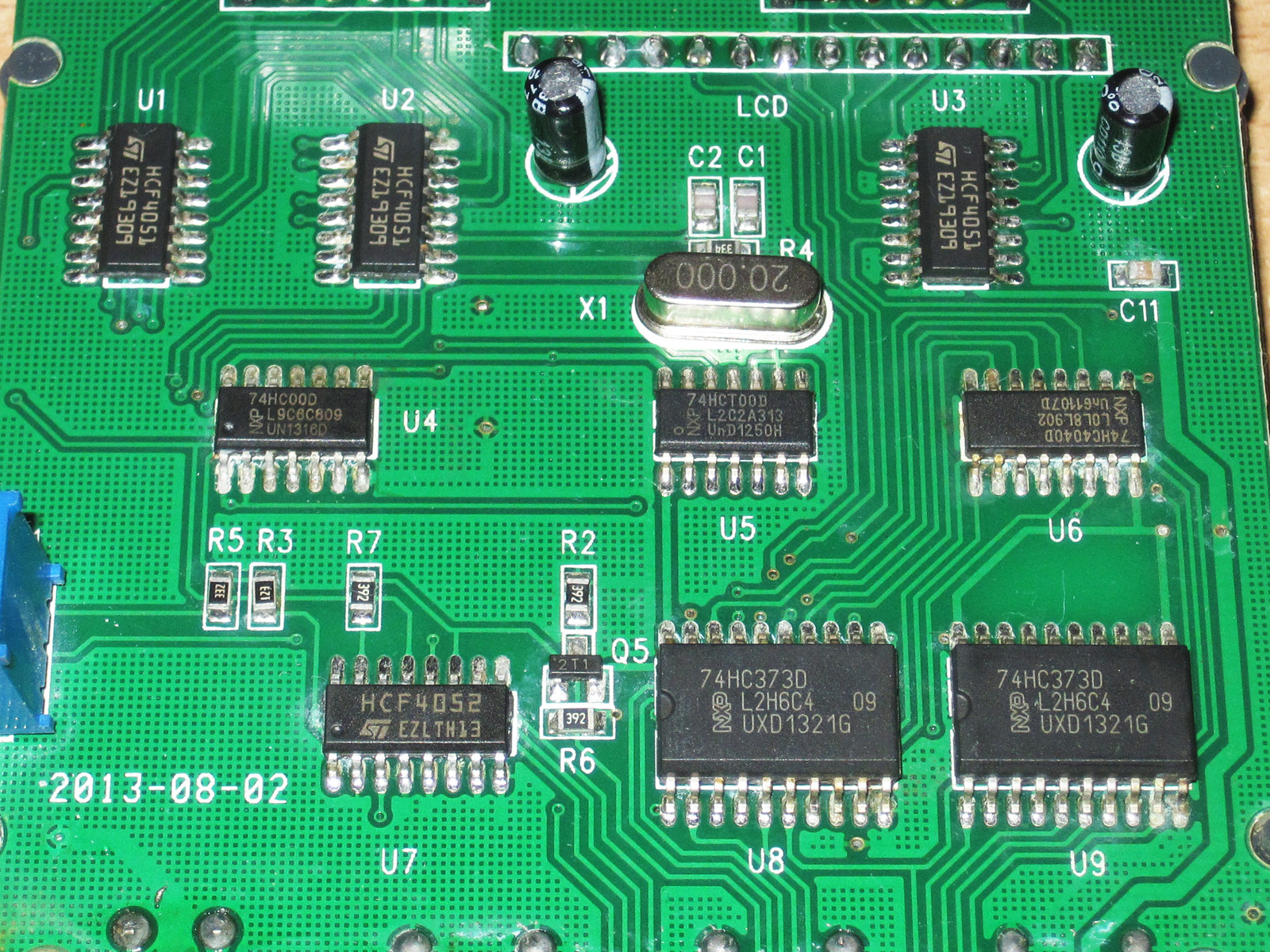
Well, looks like I'll have to open it up. Inside is a 1604 display. It's very high-contrast and there's nothing wrong with it, but using it without a backlight is very inconvenient.

The circuit board is substantially different from the boards in the other two versions of the device.
It actually looks like some kind of intermediate version.

Well, basically I got the previous version of the device, the difference being AA batteries instead of AAA and eight remote units instead of one… :(
This is what a connection through a good cable to a working remote unit looks like.

One of the remote units arrived damaged.

Like it or not, I had to open it up. As it happens, by a twist of fate, I opened the same remote unit as the author of the previous review. :)
There don't seem to be any obvious issues with the soldering, but it turned out there was a blob of solder under one of the resistors, causing a short circuit.

Nothing special on the back, apart from a poorly cleaned circuit board.

I removed the resistor with a hot-air gun, cleaned up the excess solder, and soldered the resistor back in place.
Everything works.

A photo of the first four remote units.
A 2.2 kΩ resistor in place of one of the jumpers

And as an extra, I sketched out the device's circuit; I don't think I made any mistakes.
As far as I can tell, the diodes look like BAS16, but I think they could be replaced with ordinary 1N4148 diodes

At readers' request, I'm posting my version of the circuit board for those whose device has only one remote unit. I hope it works.
The board is routed to fit inside a standard surface-mount telephone socket housing.

Another shortcoming came to light while using the device.
The device has a calibration option. That is, you connect a cable of a known length and adjust the reading on the screen to match that length (only even numbers, in 0.2 m increments). The device then gives more accurate measurements.
The photo shows a 16.6 m cable connected

But if you turn the device off and then back on, the calibration is lost.
Maybe that's how it's supposed to work, maybe it's a bug—I don't know. But I think it would be more convenient to save the calibration while still having the option to restore the default settings.
All measurements below use the factory settings.
A standard cable for indoor installation. 16.6 m

A section has been added to the previous piece of cable, but wires 4 and 5 are broken, while wires 7 and 8 are shorted at the cable junction.

I broke wires 4, 5, 7, and 8.
The device shows the length to the remote unit and to the break. The readings are reasonably close to the actual values.


Summary.
Pros
The device does work, though not as accurately as I’d like. Even so, its accuracy can make the job much easier. More accurate devices that work on a different principle also cost more. This device is accurate enough to save you from tearing open the entire ceiling to find a break.
Eight remote units. I’ve only used four so far, but they come in handy when you need to test several cables and have quite a walk back each time.
A very handy carrying case.
Cons.
It’s an older version of the device.
It takes four batteries, not two as expected.
No backlight.
The power button is very poorly designed; it’s VERY easy to press accidentally. Even while putting the device in its case.
Not very accurate.
In my opinion, it’s a very handy device, but not the version I expected. It’s quite useful for people who work with local area networks.
как пользоваться fy8178 инструкция, nf8108 m руководство пользователя на русском, noyafa nf-8601w прошивка, noyafa сравнение nf-8601w и nf-8508, nf-8209s схема, кабельный тестер noyafa неправильно измеряет при минусовой темперетару, nf8108a обзор, noyafa nf8209s прршивка, nf-8108 инструкция на русском языке, tm8108-s, nf-8601 firmware, noyafa nf-8108a тестер сетевого кабеля инструкция по эксплуатации, noyafa nf-8601w отзывы, прошивка noyafa nf-8209s, noyafa nf-8209s прошивка, noyafa nf8108 инструкция, noyafa 8209s прошивка, noyafa nf-8601w обновление прошивки, nf8108-m как пользоваться, обновление прошивки nf-8209s, noyafa nf-8601s прошивка, кабель тестер nf 8108-a показывает local found, прошивка nf-8601, nf8108-a купить ответную часть, noyafa 858c отзывы
Questions and answers
What can the NF8108 cable tester do?
It checks twisted-pair cables and displays cable length and distance to a break. The author says its accuracy is usually enough to avoid opening an entire ceiling to find a fault.
Why did the NF8108 overestimate the length of the stranded cable?
On a 13.7 m piece of stranded twisted-pair cable, the tester gave a substantially higher reading. The author suggests this may be due to the cable's lower capacitance per unit length.
What were the drawbacks of the NF8108 in the review?
It came with old firmware 5.1 and no display backlight, and used four AA batteries instead of two. Calibration also reset after power-off, and the power button was easy to press accidentally.
This model is included in the summary table: Comparison of measuring instruments reviewed on the blog
The figures from this review are in the measurement database: Measuring instruments
Discounted products
You may be interested in


Discounted products
All the content on the site and the advice are free, but we’d be grateful for your support of the project and the channel!
Comments14
Only registered readers can comment. It takes a minute to sign up, and you can log in with the same account you use on the forum.
Log inRegister
Comments are published in their original language.